Introducing pgtui, a Postgres TUI client
March 16, 2026
terminal, database, rust | permalink
A couple years ago or so, I had an idea: "Write in markdown, save in database. This is how I'd like to interact with a database: use my favorite text editor and markdown to create a record (and mostly I'm thinking blog posts and the like), then that gets parsed out and stored in a database to get all the benefits of a database."
Since then, the idea has evolved slightly, but not terribly much. Rather than markdown, it's TOML, though it could be markdown (or HTML or plaintext or, I suppose, something else entirely) within the TOML. (And that is exactly how I'm writing at the moment.)
Mostly, it's been a lot of work to implement the idea, and pgtui, a Postgres TUI client, is the result. Since the initial 0.1 release in April 2025, which was just a placeholder, there have been many features added and even more bugfixes. One of the more difficult things was figuring out how to go back and forth between TOML and Postgres types, and sqlx was leaned on quite heavily for that. The toml library and ratatui were also crucial in development.
Here are the main features:
- browse all non-system relations of a database
- sort and filter those relations
- view relation definitions/descriptions (this is the one part of the client where
psqlis used, though I plan on removing that reliance at some point) - browse paginated data in tables
- sort data by column
- filter data by writing a where clause
- insert new records into a table (using your favorite terminal editor, of course)
- edit records, with the ability to abandon midway (again, in a terminal editor)
- view-only mode in editor
- delete records (with confirmation required)
- multi-column primary key support
- store database connections in a configuration file, switch between them
- in-client display of all available controls
Screenshots:
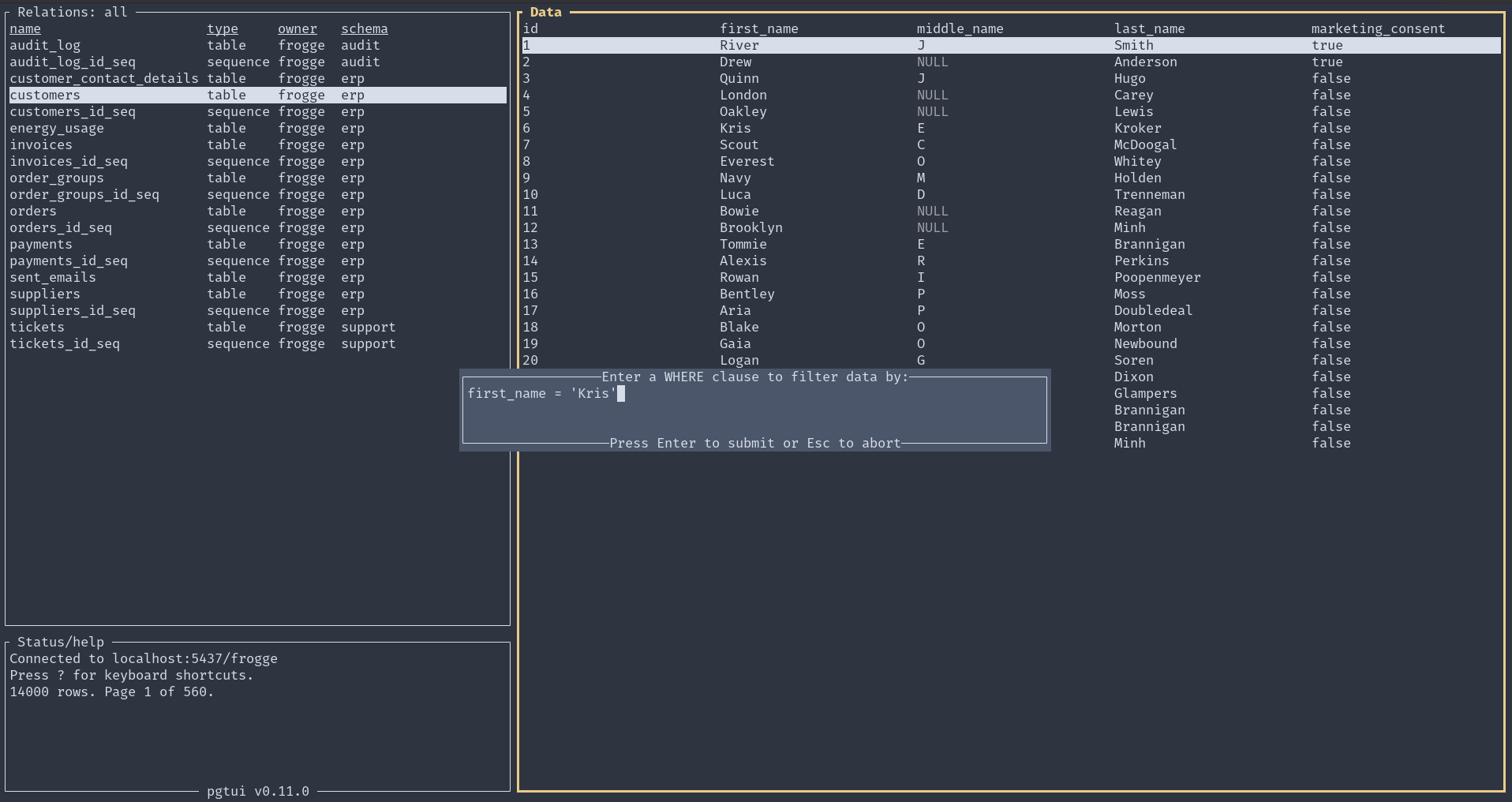
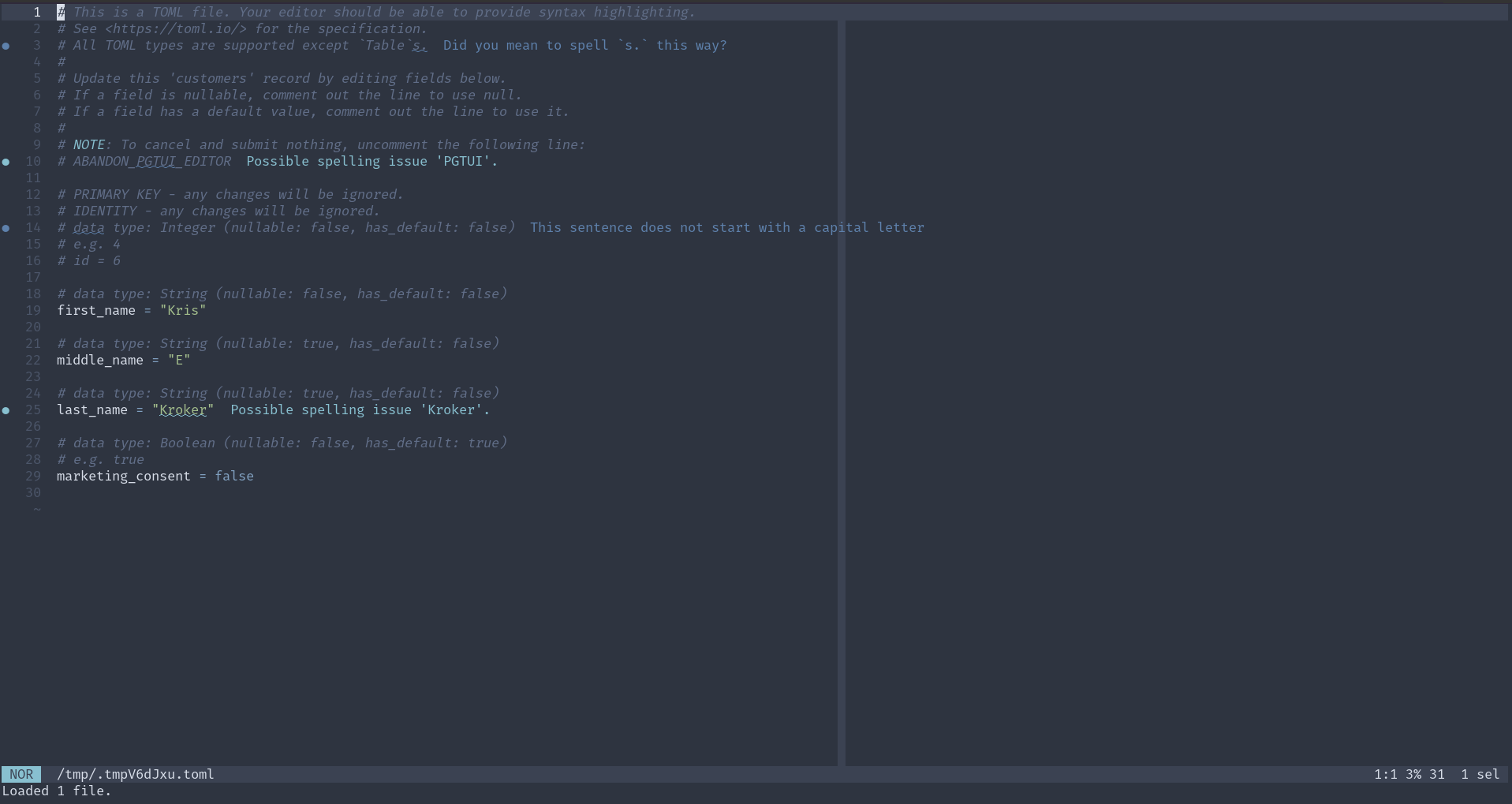
Here is a demo of version 0.10.0:
For further usage and installation instructions, see the README.
Postgres Domain v. Constraint
May 28, 2025
I'm working on cleaning some data, and I'm identifying the bad data by trying to enter it into tables with constraints and domains. I have not used domains until today. Postgres's glossary defines a domain as "A user-defined data type that is based on another underlying data type. It acts the same as the underlying type except for possibly restricting the set of allowed values" and then points you to section 8.18 for more information.
I've found three situations where domains are more useful than constraints:
- Since they are types, they can be defined once and used in multiple places. You cannot do this with constraints. If you want to use the same constraint on multiple columns, you have to write out the exact same text on each of them.
- When a value violates the constraint on a domain - at least using Postgres's COPY function - it tells you the specific value (and only that value) that violated it. If a constraint on a regular type is violated, the error is less specific and prints out the entire row (or part of it) where the violation occurred. If there are many columns in the row, it makes it difficult to identify which value caused the issue.
- Domains can be redefined. In my work, I first defined a domain with a constraint that was supposed to match the data. If there was a violation, I redefined the domain with a less restrictive constraint until there was no violation. My work in identifying issues is thus shown in the code. You cannot do this with constraints, at least not in the same way. Constraints don't replace each other; you'd have to erase or comment out a more restrictive one to get to a less restrictive one.
Installing a Postgres Version Not in Your (Debian/Debian Derivative) Distro's Packages
April 15, 2025
coding, database, sysadmin | permalink
Hello future me, you're welcome.
I found myself wanting to use the latest version of Postgres - 17 - but it was not available in the system packages for both my desktop (running Pop_OS! 22.04) and the server it would also be used on (running Debian 11). Not surprising, especially on the Debian side. However, what was surprising was how uncomplicated it was to install and configure. (I hesitate to say "simple".)
Much of this comes from Postgres itself, along with a couple Debian tools. On the Postgres side, they have excellent instructions at Linux Downloads (Debian). I am copying the manual instructions here for posterity (for whatever reason, the script they provide didn't work for me - I assume it was an issue with permissions/ssh/interactive-ness):
# Import the repository signing key:
# Create the repository configuration file:
# Update the package lists:
# Install the latest version of PostgreSQL:
# If you want a specific version, use 'postgresql-17' or similar instead of 'postgresql'
I had not previously been aware of the file at /etc/os-release. Sourcing the variables there with . /etc/os-release is something I'll have to remember. What I did was use $(lsb_release -cs) instead, but I think only because I originally missed that line somehow.
That's all well and good, but what if you found those instructions after following other, inferior instructions elsewhere and you have an aborted installation that still has lingering configuration files ... somewhere?
Here's where the Debian tools come in handy. One of the main issues I had was that the port was set to the wrong number (totally my fault, but regardless) and I couldn't figure out where it was. A combination of pg_ctlcluster (and specifically pg_ctlcluster 17 main status in my case), pg_dropcluster, and pg_createcluster to the rescue. Check the man pages for more info, but it's pretty straightforward. If you're like me and have multiple versions of Postgres hanging around, don't forget to specify the port with the -p flag.
NOTE: If you use Ansible, a lot of this work is available as a role in the repository for this website here.
Don't Use Serial
August 12, 2024
On one episode of Postgres.fm, the hosts discuss some "Don't Do This" lists, one of which is hosted by Postgres itself. I hadn't heard of this before, and so checked it out and discovered that using the serial type (as an auto-generated number, typically for primary keys) is not recommended, unless you're supporting a version older than Postgres 10. I didn't start using Postgres until version 12, so I'm definitely not supporting any database on version 10.
Since reading that page some time ago, I've had replacing my usage of serial in my veganbot database on my task list, and didn't get to it until today because I thought it was going to be a bit of a pain in the ass. Turns out, it was super simple! For example, turn this:
(
id serial PRIMARY KEY,
);
into this:
(
id integer PRIMARY KEY GENERATED ALWAYS AS IDENTITY,
);
See the Postgres documentation here and here for more information.
Various items
September 14, 2021
daybook, bash, database, python, ansible | permalink
Bash: I think I already knew this, or at least had a general feeling that it was true, but now I read explicitly (in Miell's Learn Bash the Hard Way) that wildcards are not the same as regular expressions.
Web apps/postgres: connection pools could have a significant effect on performance when there's a fair amount of traffic.
Python: you can include on requirements file inside another. Useful for a base/production file and then a separate dev reqs file.
Ansible: set_fact allows you to create variables at runtime (most variables are created at beginning of play).