Where was I?
March 18, 2026
It is quite easy to get distracted or disturbed while in the middle of a task. When on a computer, I'm often in a terminal. I just realized a very easy way to know what to return to:
echo "Drop triggers"
Hope this helps, future me.
Introducing pgtui, a Postgres TUI client
March 16, 2026
terminal, database, rust | permalink
A couple years ago or so, I had an idea: "Write in markdown, save in database. This is how I'd like to interact with a database: use my favorite text editor and markdown to create a record (and mostly I'm thinking blog posts and the like), then that gets parsed out and stored in a database to get all the benefits of a database."
Since then, the idea has evolved slightly, but not terribly much. Rather than markdown, it's TOML, though it could be markdown (or HTML or plaintext or, I suppose, something else entirely) within the TOML. (And that is exactly how I'm writing at the moment.)
Mostly, it's been a lot of work to implement the idea, and pgtui, a Postgres TUI client, is the result. Since the initial 0.1 release in April 2025, which was just a placeholder, there have been many features added and even more bugfixes. One of the more difficult things was figuring out how to go back and forth between TOML and Postgres types, and sqlx was leaned on quite heavily for that. The toml library and ratatui were also crucial in development.
Here are the main features:
- browse all non-system relations of a database
- sort and filter those relations
- view relation definitions/descriptions (this is the one part of the client where
psqlis used, though I plan on removing that reliance at some point) - browse paginated data in tables
- sort data by column
- filter data by writing a where clause
- insert new records into a table (using your favorite terminal editor, of course)
- edit records, with the ability to abandon midway (again, in a terminal editor)
- view-only mode in editor
- delete records (with confirmation required)
- multi-column primary key support
- store database connections in a configuration file, switch between them
- in-client display of all available controls
Screenshots:
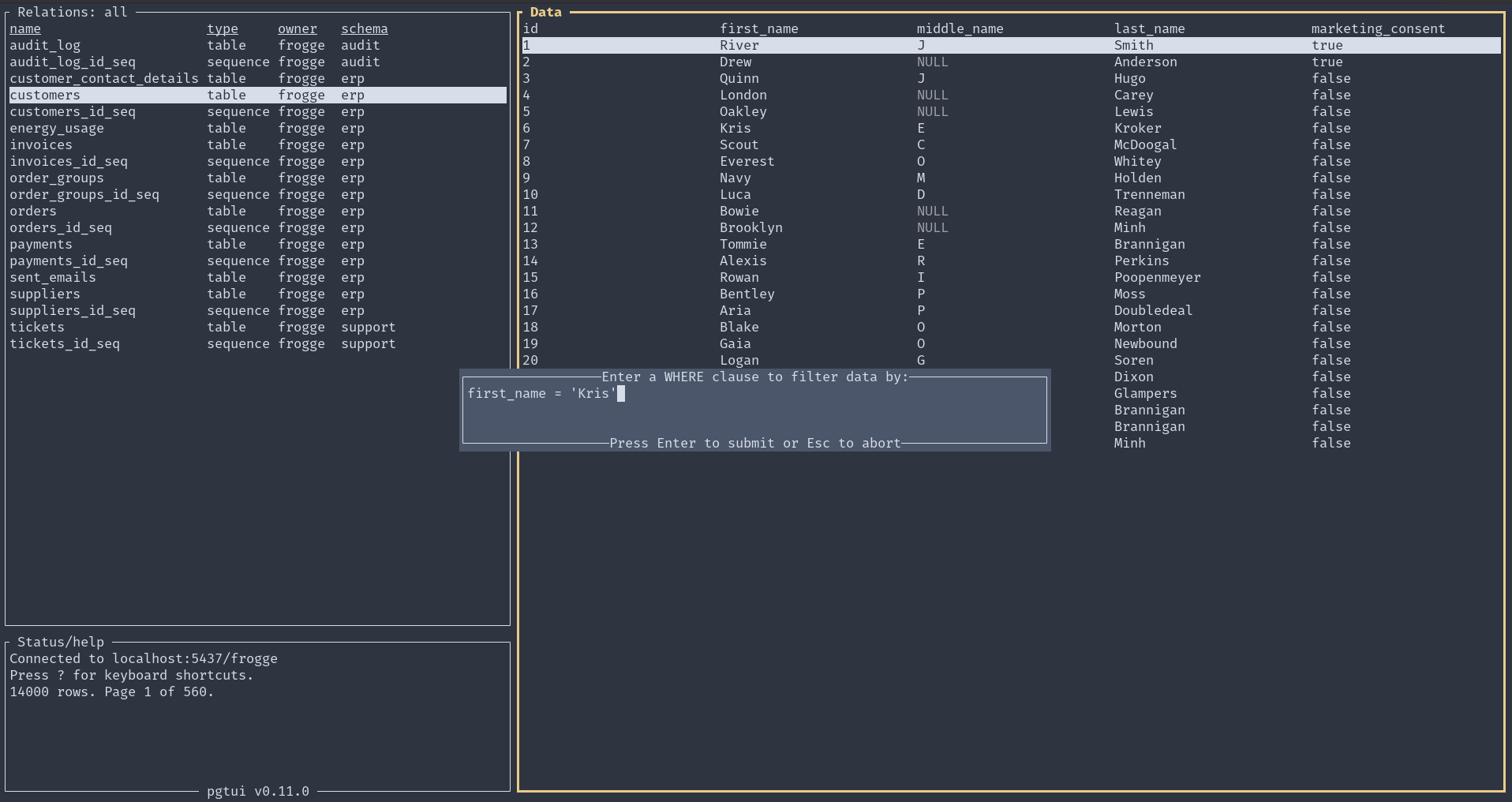
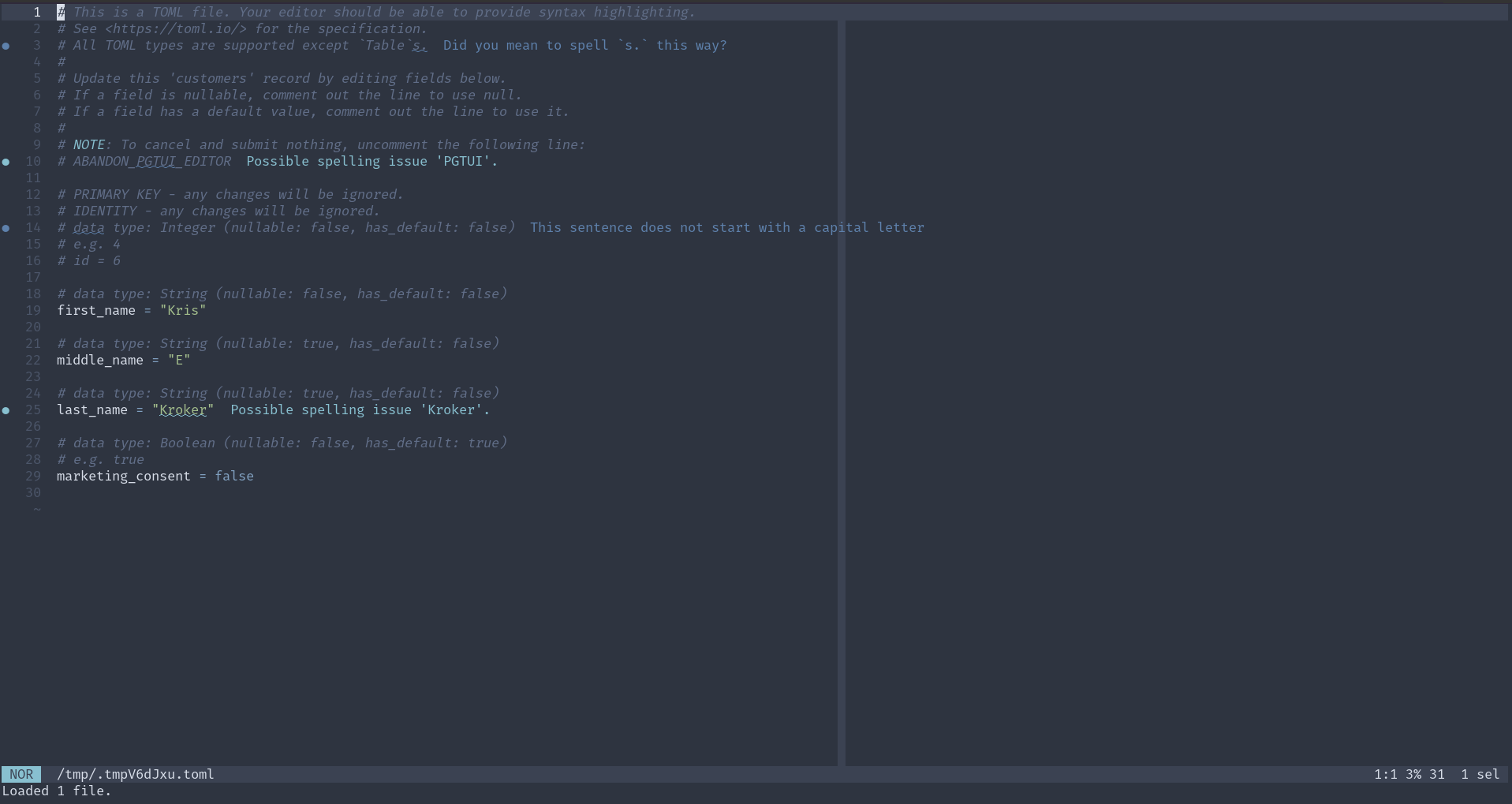
Here is a demo of version 0.10.0:
For further usage and installation instructions, see the README.
Make a program start on login in Gnome
January 26, 2026
Find the program's .desktop entry:
find -name *.desktop (if you don't know the specific name)
Make a symlink to the ~/.config/autostart directory:
ln -s path/to/program.desktop ~/.config/autostart/
RSS feedreader forgotten no more!
Simple Timing in plpgsql
June 18, 2025
There are numerous ways to get the current date/time in Postgres (see https://www.postgresql.org/docs/current/functions-datetime.html#FUNCTIONS-DATETIME-CURRENT). However, to do some simple timing of operations, you want clock_timestamp(). Here's an example in plpgsql:
do $body$
declare
op_start time;
op_end time;
begin
op_start = (select clock_timestamp);
for i in 1..1000000 loop
perform (select 1 + 1);
end loop;
op_end = (select clock_timestamp);
raise info '%', (op_end - op_start);
end;
$body$
Name it "timing.sql" and run with psql -f timing.sql.
Share colorized diffs
June 6, 2025
-
Install difftastic:
cargo install difftastic -
Install ansifilter:
sudo apt install ansifilter -
diff two files and turn the output into html:
difft --color always a.txt b.txt | ansifilter --html > colorized_diff.html. -
Share the file.
Make curl use stderr properly
May 30, 2025
daybook, shell, curl | permalink
At work, there was a cronjob that used curl, and it was sending an email every time it ran, which in theory it shouldn't have because I was redirecting the stdout from the curl call to /dev/null with > /dev/null. But it did, so after the internet failed to deliver me a good answer, I took a peek into man curl.
What was happening is that curl reports the progress of a request to stderr. Why? I don't know. Stderr is weird. I wanted only actual errors to be emailed to me. So I turned off progress reporting with --no-progress-meter. But if I tried a url that returned a 404, that was also getting binned into /dev/null, e.g. curl --no-progress-meter https://kdwarn.net/api/no-api-here > /dev/null returned nothing, meaning there was nothing getting reported to stderr. Then I found the --fail option, which makes curl report error 22 (and the http error) to stderr, so now I get only the error reported to stderr with curl --fail --no-progress-meter https://kdwarn.net/api/no-api-here > /dev/null. I tested binning stderr to make sure I wasn't insane (because the curl documentation on this isn't very clear), and in fact curl --fail --no-progress-meter https://kdwarn.net/api/no-api-here 2> /dev/null prints no output.
Postgres Domain v. Constraint
May 28, 2025
I'm working on cleaning some data, and I'm identifying the bad data by trying to enter it into tables with constraints and domains. I have not used domains until today. Postgres's glossary defines a domain as "A user-defined data type that is based on another underlying data type. It acts the same as the underlying type except for possibly restricting the set of allowed values" and then points you to section 8.18 for more information.
I've found three situations where domains are more useful than constraints:
- Since they are types, they can be defined once and used in multiple places. You cannot do this with constraints. If you want to use the same constraint on multiple columns, you have to write out the exact same text on each of them.
- When a value violates the constraint on a domain - at least using Postgres's COPY function - it tells you the specific value (and only that value) that violated it. If a constraint on a regular type is violated, the error is less specific and prints out the entire row (or part of it) where the violation occurred. If there are many columns in the row, it makes it difficult to identify which value caused the issue.
- Domains can be redefined. In my work, I first defined a domain with a constraint that was supposed to match the data. If there was a violation, I redefined the domain with a less restrictive constraint until there was no violation. My work in identifying issues is thus shown in the code. You cannot do this with constraints, at least not in the same way. Constraints don't replace each other; you'd have to erase or comment out a more restrictive one to get to a less restrictive one.
Installing a Postgres Version Not in Your (Debian/Debian Derivative) Distro's Packages
April 15, 2025
coding, database, sysadmin | permalink
Hello future me, you're welcome.
I found myself wanting to use the latest version of Postgres - 17 - but it was not available in the system packages for both my desktop (running Pop_OS! 22.04) and the server it would also be used on (running Debian 11). Not surprising, especially on the Debian side. However, what was surprising was how uncomplicated it was to install and configure. (I hesitate to say "simple".)
Much of this comes from Postgres itself, along with a couple Debian tools. On the Postgres side, they have excellent instructions at Linux Downloads (Debian). I am copying the manual instructions here for posterity (for whatever reason, the script they provide didn't work for me - I assume it was an issue with permissions/ssh/interactive-ness):
# Import the repository signing key:
# Create the repository configuration file:
# Update the package lists:
# Install the latest version of PostgreSQL:
# If you want a specific version, use 'postgresql-17' or similar instead of 'postgresql'
I had not previously been aware of the file at /etc/os-release. Sourcing the variables there with . /etc/os-release is something I'll have to remember. What I did was use $(lsb_release -cs) instead, but I think only because I originally missed that line somehow.
That's all well and good, but what if you found those instructions after following other, inferior instructions elsewhere and you have an aborted installation that still has lingering configuration files ... somewhere?
Here's where the Debian tools come in handy. One of the main issues I had was that the port was set to the wrong number (totally my fault, but regardless) and I couldn't figure out where it was. A combination of pg_ctlcluster (and specifically pg_ctlcluster 17 main status in my case), pg_dropcluster, and pg_createcluster to the rescue. Check the man pages for more info, but it's pretty straightforward. If you're like me and have multiple versions of Postgres hanging around, don't forget to specify the port with the -p flag.
NOTE: If you use Ansible, a lot of this work is available as a role in the repository for this website here.
rsync with --update
February 8, 2025
Calling rsync with the --update flag will "skip files that are newer on the receiver", according to the man page. That is, it will only copy the file over if it is newer than the destination file. scp can't do this, and so it's a nice convenience even if rsync needs to be installed. I discovered this as I am trying to rely more on just and the shell than Ansible, which is good but also kind of gets you out of practice.
The Joy of Colocating Tasks and Notes in Plain Text
December 21, 2024
My recent gardening post, about gardening/yardwork for the fall season, was not long nor in-depth, but it was fairly comprehensive and quick to do. I could have spent more time on it, but I didn't need to. And not needing to is the important thing: this was the second of such posts I wrote, and I knew it was going to be easy because of the system/routine I'm working out. Mainly, that is writing about projects in a zettelkasten-like system, keeping tasks about those projects along with their notes, and using the taskfinder TUI I built on top of it to stay on top of tasks. Project notes and tasks live together, and the lack of context-switching is great. On top of that, it's all stored locally on my computer, which has the benefit of not requiring an internet connection and the obvious privacy benefits. Of course, this does not scale to collaborative efforts, at least not now. But it works well for my needs, and that is good.
at
December 17, 2024
Want to run some program, but perhaps not right at the moment? at to the rescue.
See:
jujutsu
November 10, 2024
EDIT, 2025-12-25: I've gone back to straight git. I think jj will probably be a passing fad that will never have the full functionality as git, nor the documentation/support/community.
This is probably going to be something of an evergreen post, updated as necessary. Unless I forget it exists.
I heard about jujutsu sometime within the last year. I have to admit my initial thought was something along the lines of "why make something else when there's git?" but then I saw that Steve Klabnik (co-author of the Rust book) is writing a tutorial on it. So, as I said on Mastodon, I guess I'm going to have to check it out. (EDIT, 2025-07-23: "Jujustsu for busy devs" is a good intro.)
And so I've been using it on personal projects for the last couple weeks and I quite like it.
Anyway, I wanted to note some things I'm getting used to/figuring out.
Workflow:
- I'm mostly using the "edit" workflow Steve describes, but not quite as he describes it.
- The happy path: When I'm done with some set of changes, I'll update the description if necessary. I'm finding that writing the description before doing any work is helpful in thinking about it before doing it, so that's why I say "if necessary". But half the time it is, and if so it's done with
jj describe(to open an editor to write the subject and optionally body of the message) or withjj describe -m <message>to write it on the command line. Push to remote, possibly. Then runjj newto start a new revision. I don't often use the-m <message>option withjj new, as I'm just trying to finish up the one I've been working on and leave things in a fresh state, but you can do that. (There's also one command that will replacedescribeand thennew:jj commit, orjj cifor short.) - Aw fuck I forgot something:
- if I've already started a new revision with
jj new, just make whatever changes are necessary and then runjj squash. This will push the changes in the working copy into the previous revision, and the working copy will be empty. If you already added a description, an editor will pop up allow you to edit the commit, very much like in rebasing ingit. - if not, run
jj newand thenjj squash. If you just runjj squashwithout starting a new revision, you'll be pushing all your changes both now and what you previously did into the the revision before the one you're attempting to add to. - if you already pushed to a remote, you can do it again, just specify the revision:
jj git push -r <rev> --remote <remote-name>. There's no need (or option) for--force. Just push it. - it's also easy to do this with only some of the changes. I'll add that later.
- if I've already started a new revision with
Pushing to remote: If finished with a revision and want to push it somewhere, don't start a new one (because you can just work on the working copy without having to specify a revision). Update the bookmark with jj bookmark set main to move the main bookmark/branch to the working copy. Then do jj git push --remote <remote-name> to push it there. Then a new revision, to start further work, can be started with jj new.
Various things:
@is the working copy and@-is used for the revision before the working copy. You can pass in the revision on most commands --r <rev>. So-r @-is the one before the working. I'm not sure how far out it goes, but tacking on additional-will go one further.jj showwill show commit description (the full one, not just the subject likejj logdoes) and revision changes. Handy asjj show @-to see previous one from working copy.jj undois pretty great. I fucked up some things and it made them go away.jj abandonis both useful and good naming. Wrote some code that's actually not worth saving?jj abandon.- to use jujutsu out of the gate with a new Rust project (rather than "colocate" it with git), pass
--vcs=nonetocargo newand then runjj git initin the project's directory. - the "builtin_log_compact_full_description" template is the one that feels most like what I expect from
git log. So I've added an alias for it, to "v", which means it can be called withjj v. The new part of my ~/.config/jj/config.toml file looks like this:[aliases] v = ["log", "-T", "builtin_log_compact_full_description"] # v for verbose - Start a branch awhile ago and then just kind of forget about it? And then you're like 30 commits from where you diverged but you want to pick up the old branch again? I'd have to probably read several blog posts and forum threads for git, but for jujutsu it took me just
jj helpand a couple minutes to figure out that the answer is justjj rebase -r [revision] -d @and everything seems ... like I wanted it to be? (-bor-smay be a better choice than-r.jj help rebaseprovides clear explanation and graphs to make the decision easy.)
It's Not REST
August 28, 2024
daybook, http, rpc | permalink
I've been building "REST" APIs for years that are not actually REST. (See "How Did REST Come To Mean The Opposite of REST?" as a starting point). I've kind of known this for a while and I've always meant to get back to and try to fully understand HATEOAS and other similar concepts. But for whatever reason - mainly, the things I built did what they were supposed to do (deliver data) - I never have. And I'm completely fine with that. REST seems overly complex and rigid. I don't need the reponse to be "self-describing" or contain the possible actions from there, and I don't really want to read yet another thing about the nuances of hypertext or hypermedia. I just need the thing to provide data. I think external, user-facing and higher-level documentation is useful.
So, what is it instead? I think HTTP-based RPC. And that's all that's really needed.
Code for Yourself
August 25, 2024
Writers have "write for yourself, not your audience" and probably a bunch of variations and maybe there's the same thing in other creative endeavors. I want to try to apply "code for yourself" when thinking about new side projects to work on. Sometimes I'll get into a "what would be a useful project?" mode of thinking when I want to do something new, and it's not productive because I just end of wasting time trying to thinking of possibilties and write nothing. I'll end up having more fun and writing more code when I just scratch my own itch.
Don't Use Serial
August 12, 2024
On one episode of Postgres.fm, the hosts discuss some "Don't Do This" lists, one of which is hosted by Postgres itself. I hadn't heard of this before, and so checked it out and discovered that using the serial type (as an auto-generated number, typically for primary keys) is not recommended, unless you're supporting a version older than Postgres 10. I didn't start using Postgres until version 12, so I'm definitely not supporting any database on version 10.
Since reading that page some time ago, I've had replacing my usage of serial in my veganbot database on my task list, and didn't get to it until today because I thought it was going to be a bit of a pain in the ass. Turns out, it was super simple! For example, turn this:
(
id serial PRIMARY KEY,
);
into this:
(
id integer PRIMARY KEY GENERATED ALWAYS AS IDENTITY,
);
See the Postgres documentation here and here for more information.
Helix * and gr
June 14, 2024
* and gr
I learned two useful things in Helix today:
- You can use
*thennto do a search for the current selection. Say you're in the middle of some word. Usemiwto select that word,*to put it into the default register (/), and thennto find the next occurrence of it. gris "go to reference". It pulls up a list of all the occurrences of whatever you're referring to. So, as in above you can select a word withmiwand then typegrto open the picker where you can navigate through the list, previewing it. Pressing enter on one will take you to that position in the code.
Hosting Rust crate documentation with Nginx
April 21, 2024
coding, rust, docs, nginx | permalink
I didn't come across a guide on how to do this with an online search (but hey, online search is a dumpster fire like most things on the internet nowadays), so thought I'd write up something quick to help others looking to host their own crate documentation. It's quite easy if you're already familiar with nginx. Here I'll be using the work project I did this for as an example. The source is available at https://github.com/dvrpc/traffic-counts; it contains a library and binary program.
Let's start locally. Clone that repo or use one of your own and then use cargo, that wonderful tool, to create the html documentation: cargo doc --no-deps --open. --no-deps excludes documentation for any dependencies; leave it off if you want them. --open opens the documentation in your browser. (For more information on creating Rust documentation, see the docs on cargo doc and rustdoc.)
cargo defaults to opening the library documentation when there is both a library and a binary, but you can easily get to the binary docs from the sidebar. Let's examine the URL we'll need to replicate. For this project, for me, the address is file:///home/kris/dvrpc/traffic-counts/traffic-counts/target/doc/traffic_counts/index.html. The binary docs are at file:///home/kris/dvrpc/traffic-counts/traffic-counts/target/doc/import/index.html. What follows target/doc/ is the important part. (That's the default location, but it's configurable.)
There is no page above those; going to file:///home/kris/dvrpc/traffic-counts/traffic-counts/target/doc/ will give you the directory index. However, as you can see by visiting that directory, there are all kinds of things there that need to be included. So, we'll make the contents of that entire directory accessible, and, though not necessary, redirect from the bare /doc path to the library's documentation.
Now go to the server (Debian for me). I cloned the repo to /opt, cd'd into /opt/traffic-counts, and ran cargo doc --no-deps. The library's index.html is located at /opt/traffic-counts/target/doc/traffic_counts/index.html. For the binary documentation, it's ...doc/import/index.html.
And finally, here are the nginx header directives, in a jinja2 template, that allow you to then serve these static files. {{ docs_url }} is the root path you want them hosted at, e.g. use "/traffic-counts/docs" for http://example.com/traffic-counts/docs. Don't forget to reload nginx after you add this to your configuration.
# Traffic Counts documentation

# Make everything at target/doc available.
location {{ docs_url }} {
    alias /opt/traffic-counts/target/doc;
}

# There is no top-level index, so redirect it to the library crate
# with the trailing slash
location = {{ docs_url }}/ {
    return 301 $scheme://$http_host{{docs_url }}/traffic_counts/index.html;
}
# and without the trailing slash
location = {{ docs_url }} {
    return 301 $scheme://$http_host{{docs_url }}/traffic_counts/index.html;
}
In the return (redirect) statements, I use $scheme://$http_host so that it'll work in both production and development environments. Particularly useful is $http_host, which will include the port with a localhost address.
Diffing
April 15, 2024
There are (at least) two ways to view the diff of both an untracked file and tracked-but-changed/not-staged files in git.
-
Add the untracked file, run
git diff HEAD. If it turns out you don't want that file added, just follow the command shown on withgit status:git restore --staged <file>. -
Use the
-N(--intent-to-add) flag ingit add, which "record[s] only the fact that the path will be added later" (fromgit add --help). As the help continues, "This is useful for, among other things, showing the unstaged content of such files withgit diffand committing them withgit commit -a."
Not sure which way I'll settle on, but I'm glad I finally looked into it. I generally do the first version, but only because I didn't know any other way. And before I end up doing that, I usually think there is some simple flag I'm missing with git diff that'll do what I want, before realizing - once again - that there's not.
Associated Functions
April 8, 2024
Associated functions in traits can be very useful.
git show
April 1, 2024
Occasionally I'm looking at the current code for a project, and want to see some previous iteration of it, often because I want to bring back some part of it. I'll typically go to the code in the software forge, find the commit I think I'm looking for, click the link to view the source at the point in the commit history, and then navigate to the file.
There's an easier way:
git logto find the commit- copy first bunch of characters (6) of the hash for the commit you want to view code from
git show [hash]:relative/path/to/file.
That goes to stdout. Pipe it to an editor, e.g.: git show 3a53e76:src/main.rs | hx. I haven't yet figured out how to set the language of the file when opening with Helix in this way, but that can be solved by setting it once the file is open with :set-language rust.
just
February 14, 2024
I've never used Make before (as someone creating the Makefile), but I just tried out just and found it to be fairly intuitive/well documented. There were a couple things I struggled with, but nothing too serious: composing recipes has some nuance that I didn't pick up on at first, silencing output of commands/recipes I got to work how I wanted but mostly by luck. The end result is that the next time the work needs to be done, using just will be a far better experience than the step-by-step directions it is replacing.
I feel like Just is a good sibling tool to Ansible. Ansible would have been overkill for what I did with Just, as well as harder to set up for a new person. just is a simple binary, no minimal boilerplate to speak of, simple syntax. I'm looking forward to seeing where else I can use it. I expect that the next justfile I create will come along much faster than this first one did.
--show-output with cargo test
February 2, 2024
daybook, rust, testing | permalink
cargo test does not display any standard output from successful tests, just that the results were successful. To get around this and see the output of dbg! or println! statements, I usually make a false assertion so that a test fails and these get shown. However, an easier way is to use the --show-output flag: cargo test -- --show-output, as mentioned in the Book. The cargo test section of the Cargo Book does not list this (for some reason unclear to me), but instead cargo test -- --nocapture, which has the same effect. I'm pretty sure I've come across --nocapture before, but I think --show-output will be easier to remember. Well, maybe. I've definitely read the book and forgot about --show-output. Noting here should help.
Capturing Catchall Test Value
January 18, 2024
I seem to have forgotten that when pattern matching in Rust, you can capture the value of a catchall test (left side of arm). I typically just use _, which will match anything, but isn't captured for further use. By creating a variable instead, it can be used on the right side of the arm, for whatever purpose. Realized this from watching Zoo's Rust Club: Error-handling.
Science, Engineering, Construction, Gardening?
January 8, 2024
I've just been reviewing notes I had taken two years ago, within a month of each other, on two different sources. I'm not sure if I thought about it much then, if at all, but I thought they were interesting reading together today.
The first is from Brian Harvey's first lecture of Computer Science 61A UC Berkeley in 2011. In it, he says, "Computer science is a bad name for what we do. It's not science and it's not about computers. Scientists ask questions about how the world works. For the most part, what we do is more like engineering - we build stuff. That's not entirely true, because of theoretical computer science, but mostly it's engineering. And it's not about computers - that's electrical engineering. We build software. Our field should be called software engineering."
A month prior, I had quoted a sentence from David Thomas and Andrew Hunt's The Pragmatic Programmer, noting that it was a good point: "Unfortunately, the most common metaphor for software development is building construction. Rather than construction, software is more like gardening — it is more organic than concrete."
At first the two quotes seem to be in opposition, but I think the broader context from Thomas and Hunt shows they aren't that different, but they are starting from different positions:
Unfortunately, the most common metaphor for software development is building construction. Bertrand Meyer’s classic work Object-Oriented Software Construction uses the term “Software Construction,” and even your humble authors edited the Software Construction column for IEEE Software in the early 2000s.
But using construction as the guiding metaphor implies the following steps:
- An architect draws up blueprints.
- Contractors dig the foundation, build the superstructure, wire and plumb, and apply finishing touches.
- The tenants move in and live happily ever after, calling building maintenance to fix any problems.
Well, software doesn’t quite work that way. Rather than construction, software is more like gardening — it is more organic than concrete. You plant many things in a garden according to an initial plan and conditions. Some thrive, others are destined to end up as compost. You may move plantings relative to each other to take advantage of the interplay of light and shadow, wind and rain. Overgrown plants get split or pruned, and colors that clash may get moved to more aesthetically pleasing locations. You pull weeds, and you fertilize plantings that are in need of some extra help. You constantly monitor the health of the garden, and make adjustments (to the soil, the plants, the layout) as needed.
Business people are comfortable with the metaphor of building construction: it is more scientific than gardening, it’s repeatable, there’s a rigid reporting hierarchy for management, and so on. But we’re not building skyscrapers — we aren’t as constrained by the boundaries of physics and the real world.
The gardening metaphor is much closer to the realities of software development. Perhaps a certain routine has grown too large, or is trying to accomplish too much — it needs to be split into two. Things that don’t work out as planned need to be weeded or pruned.
I don't know that Harvey would disagree with this much; it's an extension of what he said, in a way.
'static for error types
January 6, 2024
daybook, rust, error-handling | permalink
A suggestion from Jon Gjengset in the chapter on error handling in Rust for Rustaceans:
Finally, where possible, your error type should be
'static. The most immediate benefit of this is that it allows the caller to more easily propagate your error up the call stack without running into lifetime issues. It also enables your error type to be used more easily with type-erased error types, as we’ll see shortly.
Variable Number of SQL Clause Predicates
January 4, 2024
daybook, rust, sql | permalink
From reviewing my notes on sqlx from a couple years ago, it seems I came up with a way to handle a variable number of SQL WHERE clause predicates, since there's no built-in way to do this. Looking at it now, it seems a little convoluted. It seems I also got a couple of suggestions from the maintainer, which I unfortunately only wrote down but didn't actually use, because they would have been a good foundation to start from, and are similar to what I did this time around. Anyway, I'm glad I forgot to check my notes before starting this little endeavor, because I think my old method would have thrown me off track for a bit. This time around, my solution is more robust, capable of handling any number of predicates. Here it is in an API I'm building with Dropshot.
/// Get union membership by union.
async
cal
December 5, 2023
cal is a useful command; I've often used it to get a visualization of where we're at in the week or month. Since I'm often in the terminal or a couple keystrokes away from one, it's the quickest way to do this. However, just cal doesn't highlight the day, which would be useful. A quick web search revealed that its partner program ncal, does this with ncal -b.
Instrumentation
November 8, 2023
daybook, instrumentation | permalink
I've heard the term "instrumentation" used - I think first and probably most on the Oxide and Friends podcast (which makes sense now that I've learned a little bit about what it is) - but have never understood what is meant by it. Well, I spent five minutes and did a web search to find out, prompted by a blog post in my RSS reader using it. It's basically a system for discovering what's going on in software and getting a better view of state/performance/errors. So I think DTrace could be considered in this realm - and hence why I've heard about it on Oxide and Friends. Originally I thought it was more about deployment or infrastructure creation.
systemctl cat
August 18, 2023
systemctl cat <service-name> will print the path and contents of the unit file for a service. I sometimes know the filename and so it's easy enough to just cat the path, but sometimes I don't and I guess several times until I give up and look it up. Just using this by default would probably end up saving some time/make things smoother.
Broken Pipe
May 11, 2023
I went down a little rabbit hole after getting a "broken pipe" error when trying to pipe the output of ts-cli to another program (head/tail). The short version of what I've learned is that repeatedly calling println! is not very performant and can cause this error. So what I'm going to do is stick all output into a String, locking a BufWriter on io::stdout, and writing to it with writeln! (and calling .ok() on it to ignore any errors). (I also tried using writeln! every time something needed to be printed, but this slows this down significantly. So both are needed - a single string and the lock/writeln! once. This is now done on the Summary command and pipes are working.
How to Learn Rust
January 21, 2023
It's been somewhere around two years since I first began to learn and love Rust. In that time, I've read a lot of things about the programming language. Here are a few resources I recommend to someone who wants to learn it as well.
Read this first: How Not to Learn Rust
Rust has its own list of learning resources, and I think they should be the starting point for anyone:
However, I'd say that Rust by Example was the least useful to me, perhaps because I did the book and Rustlings first. In any case, I recommend doing something like this: read the book and do the Rustlings course at the same time, then work on some small project, check out Rust by Example, then read the book and do Rustlings again. I think I'm on my fourth run of Rustlings and each time I notice that my skills are improved, but there are also still some things that I have to seek help for.
Also, note that there's now an interactive version of the book, from two researchers at Brown University. Maybe you want to try that out instead of the standard version?
Next I'd recommend the 2nd edition of the book Programming Rust. It's absolutely great and I've found that it is also a good reference to turn to first, rather than trying to search online.
Speaking of online help, you cannot go wrong with the Rust users forum. Search it for issues you have. Regularly browse it to see other questions people have and the solutions that are proposed.
There's also a plethora of Discord servers out there - two general Rust ones and it seems like one for every published crate. I personally dislike Discord because it walls off knowledge and is an absolutely horrible platform for trying to discover information (it was, after all, meant for gaming chat), but that's often where you have to go to get help for very specific things. If you can't find help elsewhere, see if the tool/framework/whatever has a Discord server and then start punching words into the search box and try to maintain patience as you wade through 50 different conversations to find what you're looking for.
Finally, something adjacent to this brief discussion is Rust Edu, which "is an organization dedicated to supporting Rust education in the academic environment."
That should get you started!
Addendum: Other Resources
- The Mediocre Programmer's Guide to Rust
- Compiler-driven Development: Making Rust Work for You - talk given by Jacob Pratt at RustConf 2024 that is beginner-friendly
- Flattening Rust's Learning Curve
- Distilled Rust
Addendum: Why learn Rust?
If you are here, you are probably already convinced that you want to learn Rust. But if not, I'm starting to collect some articles that praise Rust and explain why. I'm not sure if I'll keep this section or not - it may go away.
let if
October 13, 2022
I've used the let if pattern before, but not enough to remember how it works, so had to refresh myself on it. It's very useful. Here's a sample from tp-updater:
let updated_indicators = if self.updated_indicators.is_empty else ;
Looping with modulus
July 27, 2022
daybook, rust, embedded | permalink
You can use a modulus operator to loop around the end of a range quite efficiently, which would come in handy in an infinite loop. I discovered this in Section 5.6 of the embedded Rust Discovery book. It was used there for turning LEDs on and off; here is just printing out the vars:
Use format! to turn chars to string
June 30, 2022
While working on a Rust exercise, at first I did some convoluted way of turning two chars into a string. But it's quite simple with the format! macro: format!("{ch}{next_ch}").
Syncing Dotfiles
May 9, 2022
For a while I kept some configuration files in Dropbox so I could get to them outside my home computer. I wrote a simple bash script that would move them from their normal locations to a directory in my local Dropbox, and then set up a cronjob to run that script every day. That was ok, but they weren't easily accessible publicly. Or at least not in the way many people share their dotfiles, which is to just have a repo for them.
So I decided to move them from Dropbox to GitHub Codeberg, which presented a small challenge — how to do the commit and push once I collected all the files into a git repository? Here's the simplified bit of bash for that:
git_status=
if ; then
&& &&
fi
If the stdout of running git status doesn't contain "nothing to commit", then it adds all files in the repo, commits with the message "Update", and pushes it. That's not a very meaningful commit message — especially not as the only message in the history after the initial set up — but I'm not particularly concerned with that and more with having the files always up-to-date and accessible.
Another small challenge was with cron. I didn't want to run the script repeatedly all day, but if I just ran it once a day there was a chance my computer wouldn't be on at the time and so the cronjob wouldn't run. Anacron to the rescue! Anacron will run jobs on a regular basis like cron, except that it is aware of the last time jobs ran and will run them again if they haven't run within the specified interval. Anacron isn't installed on Linux distos by default (or at least not Debian and its derivatives), but it's a simple sudo apt install anacron to install it. By default, anacron's configuration file is location at /etc/anacrontab and it tracks jobs run at /var/spool/anacron. I wanted these to be in my user space, so I created those directories/files under ~/.anacron. Here is the part of the config file (~/.anacron/etc/anacrontab) related to this project:
There are two other pieces to this. The first is including this in my ~.profile file, so that anacron runs on startup:
And the second is a regular cronjob that will run anacron every hour (which causes anacron to check if any jobs need to be run, and run them if so):
0 * * * * anacron -t "$HOME/.anacron/etc/anacrontab" -S "$HOME/.anacron/var/spool/anacron"
That's pretty much it. Here's the link to the repo, which includes the full manage_dotfiles bash script.
Generic and traits
April 18, 2022
I finally have a decent understanding of generics and traits. Something clicked when I was reading about them in Ch 2 of Programming Rust. I imagine that I came across similar descriptions of these before, but it really helped this time around having some more experience with the language. I don't think I knew that generic types were called "type parameters" when you put them in function signatures. So, just having a term for that helps. That's fn<T>(t: T) {}. And you can specify not just any type, but a type that implements a specific trait: fn<T: FromStr>(t: T) {}, which can be read as "For any type that implements the FromStr trait." When writing this up in my notes, I also came across returning a type that implements at trait, which makes more sense now, although I just came up with a few questions to dig deeper into the whole subject that I need to look into sometime.
fold()
February 20, 2022
I think I finally get fold(). In Rust at least, this is a method on an iterator. Its form is:
.fold;
1..=4 is a range, so this will iterate from 1 to 4.
The 1 immediately following fold( is the initial value. So this could be anything, and will typically come from whatever you're iterating over. The next part - |acc, x| acc + x is the closure that .fold() takes - this consists of two parameters (the "accumulator", acc, and current element of the iteration, x) and the operation of the closure (acc + x). So with each iteration, the operation is performed, and the acc parameter holds the result, which then gets used in the next iteration.
The above example is a factorial, and so multiples every number for 1 to 4 (inclusive) together, resulting in 24.
Client Interface First
January 19, 2022
Interesting bit from the Rust book, Ch. 20:
When you’re trying to design code, writing the client interface first can help guide your design. Write the API of the code so it’s structured in the way you want to call it; then implement the functionality within that structure rather than implementing the functionality and then designing the public API.
Similar to how we used test-driven development in the project in Chapter 12, we’ll use compiler-driven development here. We’ll write the code that calls the functions we want, and then we’ll look at errors from the compiler to determine what we should change next to get the code to work.
Transforming programming
January 17, 2022
"Transforming programming" is the title of topic 30 of The Pragmatic Programmer (though a better title would probably be "transformational programming".) The gist is "we need to get back to thinking of programs as being something that transforms inputs from outputs". Uses example of Unix philosophy and piping. This makes a lot of sense to me, and in Rust it is essentially how iterators work - you keep chaining methods onto the iterator to do some work on each element in the collection, and then pass the outputs to the next method. This section also mentioned an and_then function, which Rust has, though they weren't talking about it in a Rust context.
Refactoring in Rust
January 9, 2022
I posted about broken-links to r/commandline the other day, and someone suggested that I use a HEAD rather than GET request to check link validity. A fair point, although what it made me realize was that I was making a GET request to each URL twice, and I could eliminate the second one if I just grabbed the html the first time and passed that along. It took about an hour and a half, and it seems to have improved performance by about 25% (depending on mix of URLs checked). So I published another version of it - 0.2.1. The refactoring wasn't the simplest thing to do, but I found that Rust's type system and the compiler errors made it pretty smooth and almost guided me in the right direction.
Iterators and collect()
January 8, 2022
Figured out rustlings/iterators2. Now the solutions seem obvious. I think what I was doing wrong was thinking that .collect() created a vector, whereas it creates whatever kind of collection you tell it to or that it infers. In this exercise, there were two functions requiring you to have a different result type, but the code was the same for both. I was making it much harder than it was, not taking advantage of .collect() and Rust's ability to infer the type.
Before solving the exercise correctly, I spent about two hours reading through the documentation on iterators as well as part of "A Journey into Iterators" by Ana Hobden. Both were very helpful. I discovered the .inspect() method in the Hobden piece, and it seems like it will really be useful in debugging/figuring out iterator chains.
Trait function signatures
January 7, 2022
I thought when you implemented a trait, the function had to have the exact same signature as the trait, but apparently you can (at least) change the parameters from being immutable to mutable. This is from rustlings/traits/traits2, the instructions of which said to implement AppendBar on a vector of strings, such that you appended "Bar" to it:
This Is What I Know about match
December 16, 2021
I've been learning Rust for some time now, and really enjoying it - the static typing, the helpful compiler, the tooling, the documentation, just about everything. I think I'm in the neophyte stage. Anyway, this is my attempt to describe the match keyword, mostly (but certainly not entirely) in my own words.
match is the keyword for pattern matching - like case in Bash and other languages, though a little more powerful. Like case, it is similar to a series of if/else expressions, where you go down through them to control the flow of code. However, if and else if expressions must evaluate to a boolean value. The match expression can evaluate to any type. Each possibility is an "arm" that has a pattern that is evaluated. All arms need to return something of the same type. The first pattern that is true has the code associated with it run (which follows a => symbol, potentially in a curly brace block, if longer than one line) - Rust will not examine any subsequent arms. Additionally, matches are exhaustive: every possible option must be handled, otherwise the code will not compile.
Use "match guards" to further refine what you are matching. This is done by following the pattern with a bool-type expression. See 2nd arm of the longer example below.
Here are some syntax options for the tests (the left side):
- just provide the value
x ..= y- inclusive range from x to yx | y- x or y_- any (this will often be done as the last arm to catch all other possibilities)
Here is an example from the Rust book, matching on enum variants:
This example (from my solution on Exercism) shows a number of these concepts as well as the matches! macro:
You can also assign the result from a match expression to a variable (example from Tim McNamara's Rust in Action, Ch. 2):
let needle = 42;
let haystack = ;
for item in &haystack
There is a shorthand expression when you care about only one of the cases and don't need to do anything for all others: if let:
if let Some = some_u8_value
(An update from the future: At first, I found the let here to be confusing, because nothing was being assigned in the block. What is the let doing!? It seems clearer syntax would be if some_u8_value == Some(3). I'm sure there are good reasons this isn't possible. But after a while, it became second nature so I stopped thinking about it.)
You can also use else with this, when you want to define the behavior to be done instead of just no behavior.
Sources:
- https://doc.rust-lang.org/std/macro.matches.html
- https://doc.rust-lang.org/std/keyword.match.html
- https://doc.rust-lang.org/reference/expressions/match-expr.html
- https://doc.rust-lang.org/reference/expressions/match-expr.html#match-guards
- https://doc.rust-lang.org/stable/book/ch06-00-enums.html
- https://www.rustinaction.com/
Braces
October 2, 2021
daybook, rust, bash | permalink
Rust and Bash have a very similar construct for iterating over ranges: x..y. Bash uses it like for i in {1..9} while Rust doesn't use the braces (though seems like parentheses may be used - but not required).
I spent some time reworking my bash note on parameter expansion (actually calling the value of a parameter by using the $ symbol), and think I have further strengthened my understanding of it, using doubles quotes in conjunction with it, and using braces in conjunction with it.
One important reason to use braces around a parameter's name (but after the $, like this: "${somevar}"), is that you can make a default value, either for immediate expansion or to assign the default value to the parameter. Immediate expansion (won't be used again if you reuse the parameter): ${somevar:-this}". Assignment (assigned here, will be used as value of the parameter in subsequent uses): "${somevar:=this}".
The Secret Life of Programs
September 21, 2021
I started reading the book, The Secret Life of Programs, Understand Computers - Craft Better Code, by Jonathan E. Steinhart. So far it seems like what I've been after in terms of a more general book on computer science and programming. And the author's got a sense of humor, which is nice. I think it has convinced me to really try to focus on the lower level stuff, much more so than the first couple of chapters of the first volume of Randall Hyde's Write Great Code series.
One thing I learned - or at least deepened my understanding of - is what "system programming" is. He describes it as: "systems programming is at the bottom of the software hierarchy. It's similar to infrastructure [...]. Being a good programmer always matters, but it matters more if you're a system programmer, because others rely on your infrastructure." Says you need to learn about application programming and computer hardware to be a system programmer.
There was also a decent discussion of the differences between coding, programming, engineering, and computer science.
Something that also resonated with me was this statement: "But the strange thing about computer programming is that unlike in medicine, in programming you can become a specialist without ever being a generalist." That's kind of where I'm at/heading (web development at the backend) unless I purposefully steer towards a more general level, which I want to do, and I think I'll be a better overall programmer for it.
Various items
September 14, 2021
daybook, bash, database, python, ansible | permalink
Bash: I think I already knew this, or at least had a general feeling that it was true, but now I read explicitly (in Miell's Learn Bash the Hard Way) that wildcards are not the same as regular expressions.
Web apps/postgres: connection pools could have a significant effect on performance when there's a fair amount of traffic.
Python: you can include on requirements file inside another. Useful for a base/production file and then a separate dev reqs file.
Ansible: set_fact allows you to create variables at runtime (most variables are created at beginning of play).
Background and Foreground
August 29, 2021
This is more something I relearned than learned for the first time.
Use Ctrl-Z to put a program you are running from a terminal into the background. You will be taken back to the terminal. Can do other stuff. Then use fg to bring the program you put into the background back into the foreground - back to the active program in the terminal. I think this will be useful in Vim when I don't need to have a dedicated terminal running in a window.
Creating a Python Virtual Environment in Debian via Ansible
July 24, 2021
coding, python, ansible, linux | permalink
Debian is my preferred Linux distribution, particularly for servers. Although it is the base from which so many other distros are derived, it seems that it gets short shrift by a lot of packages. It took me a little while to figure out how to create a Python virtual environment on it with Ansible, so here is a quick example in the hopes that it may help others who hit this particular hurdle.
Two system installations are necessary:
- name: Install system packages
  apt:
    name:
      - python3-pip
      - python3-venv
      # others you need
    state: present
I prefer to use built-ins wherever possible, so I use venv rather than packages like virtualenv or pyenv for virtual environments. Here is the task that will create one, using the pip module. It will also install any dependencies listed in a requirements.txt file:
- name: Set up virtual environment and install requirements.
  pip:
    virtualenv_command: /usr/bin/python3 -m venv
    virtualenv: "/project/path/ve"  # the directory to install the ve
    requirements: "/project/path/requirements.txt"
You would think that would be all it takes, but for some reason, Ansible still appears to want to use Python 2 with Debian, so you need to tell it again that you want to use Python 3, this time at the inventory level. Declare the executable explicitly in the inventory file with the ansible_python_interpreter variable, e.g.:
all:
  hosts:
    my_host:
      ansible_host: # domain or ip
      ansible_private_key_file: # /path/to/key
      ansible_python_interpreter: /usr/bin/python3
Voilà, you should have a Python 3 virtual environment using the built-in venv module.
Host-dependent variables in Ansible
July 24, 2021
Ansible: I don't know if I learned this or re-learned this, but it's quite easy to set up host-dependent variables.
Here's one example of a file structure:
project/
 |--inventories/
    |--local/
    | |--host_vars/
    |   |--[name of host].yaml <-- where the variables are for this host
    |--production/
      |--host_vars/
        |--[name of host].yaml <-- where the variables are for this host
"group_vars" directories (at same level as "host_vars") would also work on the group level, if you have groups of hosts defined.
Various items
July 12, 2021
daybook, bash, python, ansible | permalink
Bash: easy way to test out conditions is to do it right on the command line, and then echo out the result of the last command, e.g.:
That will result in "1" being printed to the terminal, since == does string evaluation.
Python: pypandoc (wrapper around program pandoc) is super easy to use to convert strings and files from one format to another.
Also, not something I learned but a good practice I've developed: anytime I want to install some new program, I do it via the Ansible playbook I set up for my computer. This way, I get more experience with ansible, and I can reproduce my computer if it dies unexpectedly or I get a new one or even if I just switch distros.
Rebase and Merge
July 5, 2021
daybook, vcs, python | permalink
Rebasing in git is similar to merging. You do it when you want to combine the changes from one branch into another. (Although you can also do it interactively within one branch to squash commits, which I've done a fair amount since figuring out how that works.) I don't understand the differences between the two strategies, but at least rebase is a little less mysterious. I learned this from Git Gud, a Python program that interactively teaches you git by having you try to do various tasks with it. The explanations of how things work are great (which you can view with git gud explain). (Side note: I don't know how this CLI is able to use git gud as its command - shouldn't git be immediately invoked and tell you it doesn't know wtf the gud subcommand is?) Anyway, also learned from that program what ~ and ^ do (at the end of a branch name or hash). I've used HEAD~ and HEAD~2 or similar before (again, with interactive rebasing), but now I understand what's going on. (~ is for the previous commit, ~N is for the nth previous commit; ^ is similar but for parent branches.)
A Couple Tips on GitHub Actions
July 5, 2021
I work primarily on a Linux machine, and for a while now I've wanted to set up the GitHub actions for my flashcards CLI (now at https://codeberg.org/kdwarn/flashcards) so that the tests can be run on Mac and Windows, because I honestly have no idea if the program will run correctly on those operating systems. The CLI is written in Python and so the main workings of it shouldn't be an issue; I was more concerned with storing and accessing the sqlite database that underpins it. (And in fact was 95% sure that how I entered its path would at least cause a failure on Windows.) Today I finally got around to doing that, although I didn't find the process exactly straightforward. Perhaps that's because I was skimming through the documentation too quickly and trying to find one particular thing, but in any case, here is how I was able to set it up.
I already had a "workflow" set up that ran tests on the Linux virtual environment (Ubuntu) that GH offers, and so I needed to update that. But before I changed that, I wanted to see if I could manually run the workflow, so I didn't have to push a new commit just to have it run. So I changed the code from:
# this is just a snippet of the larger file
on:
push:
branches:
pull_request:
branches:
to:
# this is just a snippet of the larger file
on:
push:
branches:
pull_request:
branches:
workflow_dispatch:
It turned out that was correct, although it wasn't immediate obvious that it was, because when I returned to the main Actions page, I didn't see the "This workflow has a workflow_dispatch event trigger" text with the "Run workflow" next to it, like I should have. I think this is because I did it on a non-main branch and did not yet submit a pull request, though I'm actually not that sure. In any case: keep an eye out, and possibly submit a pull request so that it shows up.
The other thing to point out is that just submitting a pull request, because of that pull_request: section above being in the workflow, triggers the workflow. I wasn't patient enough and left the page before GH could initiate the workflow and show me that it was running. Had I waited just a couple seconds after submitting the pull request, I would have seen this (as I learned subsequently on another). So I didn't even really need to set up the manual running of the workflow - just making a commit and pull request would have triggered it, without needing to commit on main or make a more substantial commit to the actual code of the project. I definitely should have realized this, as I've seen it when I've submitted pull requests to other projects, not to mention that it's specified right there in the workflow configuration. But hey, you sometimes you have to give yourself extra unnecessary busywork in order to realize something in a new context. And plus now I at least know how to set up a workflow so it can be run manually.
Finally, to the whole point of what I was doing. Setting up the additional OS environments was pretty simple. From:
# again, just a portion of the file
runs-on: ubuntu-latest
strategy:
matrix:
python-version:
to:
runs-on: ${{ matrix.os }}
strategy:
matrix:
os:
python-version: # also added 3.9 here
Vagrant, Libvirt, and Ansible
April 3, 2021
coding, ansible, virtualization, linux | permalink
I recently started to learn how to use Ansible, from Jeff Geerling's book Ansible for DevOps, which so far I highly recommend. A bit of a pain point has been using virtual machines created by vagrant as if they were remote servers — without using Ansible as a provisioner and just running Ansible commands like normal. I think I now have a good workflow that I thought might help others in this situation.
First, a couple notes on my setup: my OS is Debian Testing (which I just upgraded to last week from Buster, which was surprisingly simple and painless to do) and I'm using libvirt as the provider, but this should probably be applicable to other configurations. I'm not going to cover installation of these or vagrant or Ansible, though perhaps someday I'll edit that in.
-
Create the virtual machine with vagrant. If you haven't yet added the box you want to use, add it with
vagrant add box [user]/[box]. Let's say it's CentOS7, since that's what Geerling tends to use:vagrant add box generic/centos7. (I haven't been using the boxes he made since they use VirtualBox rather than libvirt.) Then initialize it:vagrant init generic/centos7. This creates the configuration file, Vagrantfile, in the current directory. If you'll be using some kind of web server on the virtual machine, open that file up and uncomment the lineconfig.vm.network "forwarded_port", guest: 80, host: 8080(putting in whatever host port you'll use in your browser to connect to it). -
Start up the virtual machine:
vagrant up. -
Get the ip address of the vm:
vagrant ssh-config. Either use it directly or put it in an Ansible "inventory" file. -
Add the ssh key of the vm to your SSH authentication agent. For libvirt vms, this is located at .vagrant/machines/default/libvirt/private_key from the vm directory (where the Vagrantfile is located), so run
ssh-add .vagrant/machines/default/libvirt/private_key. I imagine that if you use a different provider, it would just be a matter of substituting its name for the "libvirt" directory.
That should do it — you should now be able to use ssh or ansible or ansible-playbook to connect to the virtual machine.
Note that if you set up multiple servers on the virtual machine and then run an Ansible command on them, you'll need to confirm the ssh fingerprint the first time. Since Ansible runs in parallel mode by default, you'll repeatedly get asked to confirm it, and it doesn't always seem to work. So I'll use one fork in this case by passing in -f 1 to the command the first time.
Flashcards CLI 2.0 Released
March 10, 2021
coding, python, cli | permalink
A little less than a year ago I was looking for a flashcards command-line interface, mainly so I could help myself memorize various Vim commands. Though I'd previously used AnkiWeb for studying, I wanted a CLI because I spend much of my time in the terminal and I wanted to be able to quickly add a new "card" and then jump back to whatever I was doing.
I primarily program in Python, so I tried out two or three different CLIs that I found on PyPI. One was broken on installation (at least with Python 3), and someone else had already raised an issue on GitHub a few months before with the same problem I had. It looked like a very easy fix so I forked the project and submitted a pull request. I didn't get a response, but I liked the interface so I started to use my version of it, and meanwhile poked around the code more. I found some areas that could be simplified, and then more and more kept appearing. Soon I was gutting most of the object-oriented code in favor of a more structural approach. Between that, switching from unittest to pytest, adding more features, and moving from file-based storage to a database, there's not a whole lot of the code I started with left.
Going from file-based storage to an sqlite database was a breaking change (and what necessitated version 2.0), but I think it was a good decision. It was prompted by sqlite repeatedly popping up lately, but also by my desire to make "reversible" cards, so that either the "question" or "answer" could appear before the other during a study session, rather than always question-then-answer. That latter part would have required some structural change within the files, and I felt like they were already cumbersome to work with. Switching to a database would not only allow me to further simplify the codebase, but also make it easier to continue to evolve features.
I doubt that anyone aside from myself had been using my version of flashcards 1.x, but just in case — and because I needed to do it for myself anyway — v2.0 (but not >= v2.1) includes a command to convert to the new format. I still have some plans for improvements, but I somewhat doubt that there will ever be a version 3.0.
Try it out if you're looking to memorize some things and like the command line!
A Zettelkasten with Vim and Bash
February 7, 2021
coding, docs, vim, bash | permalink
A few years ago I decided to take coding from an on-and-off hobby to a professional endeavor and I've been keeping notes on the various things I learn since that time. This started off with notes on Python, I think in a libreoffice doc, in the form of dated entries. That soon became difficult to find information in, and so I moved to a markdown file, structured by topics (and subtopics, and then subtopics of subtopics, etc.). Meanwhile, I also started similar files on other things - git, contributing to open source, flask, javascript, css, etc. I was also bookmarking blog posts, talks, and other useful items, along with sometimes extensive notes on them. If I took an online course, I would also create a file for taking notes on the content. Sometimes I would piece it back into the topic files, but generally it was kind of a pain and so I didn't. Between the different files and the bookmarks, it was sometimes difficult to find something I swore I had taken notes on. And if I couldn't find it, back to Google or Stack Overflow.
More recently, I switched from using VSCode to Vim as my editor of choice, in part because of frequently needing to ssh into remote systems and write or modify some code on them. I quickly fell in love with its editing style and haven't looked back. I generally prefer to use as much vanilla Vim as possible and have about ten plugins installed, but I still tweak things now and again and I'm interested in how others have their Vim set up and how they use it. It was while following that interest that I stumbled across the concept of the "Zettelkasten" (German for "slip-box") in a blog post about note-taking in Vim.
I've now being using the zettelkasten (zk from here on out) system for a few months and can say that it's made what was previously a mess of notes much more useful, discoverable, and enjoyable to maintain. I started by taking better, more "atomic" notes, and then as I touch upon different subjects, I pull in other parts of my previous spaghetti-code-like notes and link to them or from them as necessary. Overall, I feel like the zk has made it much easier to both explore subjects and remind myself how I did something. I also use it for some non-coding things, and having it all in one place makes my professional and intellectual life more structured and organized. But I'm not here to write another blog post evangelizing the zk system or what to name different types of notes or how to connect them. I think there's probably been enough of that done, and if there were one resource I'd recommend, it would be Sönke Ahrens's How to Take Smart Notes.
What I am here to write about is my particular zk structure and the minimal tooling for adding to, managing, and exploring my zk. As the title of this post suggests, it basically comes down to Vim and Bash, through a handful of functions, commands, and shortcuts.
Structure
Everything is contained within plaintext files, in the following layout:
zk/
  index.md
  doc/
  notes/
  refs/
The doc/ folder is a holdover from my old system of long, topic documents. There's still about ten files in it, but I'm slowly working my way through them and breaking them up into smaller pieces. The refs/ contains references. These just have the author, title, date, and, if the reference is available online, a link to it. The filename is in the format author-yyyy.md. The actual content of the reference is stored in Zotero (in case the page ever goes down) or Calibre (if an ebook). The notes/ folder contains all the actual notes.
The index.md file is the main entry point of the zk. In addition to containing links to other notes, the index also includes a list of tags I've used, some notes on how to navigate about, and brief descriptions of the shortcuts and functions I've created.
I have a shortcut in my .bashrc file to the zk directory so that I can cd into it quickly from anywhere, with just cd $zk:
zk="/Dropbox/zk/"
As you can see, I have the zk in my Dropbox folder, so it's always synced and backed up. I also back it up to an external hard drive, under a timestamped directory, every three months.
Saving and Linking Notes
I'm often already in Vim when I want to create a new note, so I use :enew to start a new, unnamed buffer. If I'm not already in Vim, it's a quick Ctrl+Alt+t to open a terminal and then type vim into the prompt. After typing up the note, I use the :Zk command I created to save the file in the notes/ folder, with a timestamp for the filename. (And no title because I may actually tweak the title - the first line of the file - over time.) Here's the function and command for that, which I have in my .vimrc:
function! SaveWithTS()
    if !expand('%:t')
        let l:filename = escape( strftime("%Y-%m-%d-%H%M"), ' ' )
        execute "write " . "~/Dropbox/zk/notes/" . l:filename . ".md"
    else
        echo "File already saved and named."
    endif
endfunction

command! Zk call SaveWithTS()
Note that if the file has already been saved, running the command will just return a comment stating that.
I'm new to Vimscript so if that's not very good code, please let me know.
After the new note is saved, it needs to be linked to some other note. The following Vim shortcut helps with that. It will get the file's relative path, add double brackets around it, yank the first line of the file (its title), and then put that altogether into the unnamed register.
noremap <Leader>l :let @y = "[[" . expand("%") . "]] " <bar> :1,1y z <bar> let @" = @y . @z<CR>
So, for me, typing \l in normal mode will do this, as I'm using the default leader. Then it's just a matter of using p to put it where I want, and it will look like this, for instance:
[[notes/2021-01-20-0351.md]] Wagtail
To make these links further stand out, I created the file ~/.vim/after/syntax/markdown.vim and added the following:
syntax match markdownRef "\v\[\[[-a-z0-9\.\/\:]+\]\]"
highlight link markdownRef Type
In the colorscheme I use (solarized8), the brackets and the path between them appear in a mustard yellow color, setting it off nicely from the rest of the text.
To follow this link in Vim, just use the standard gf shortcut when the cursor is on it. The relative path works, because I always start my zk from the zk/ directory. Someday I may want to move the zk out of my Dropbox folder, and if I were to use full paths, all the links would then be broken.
Exploring the Zk
In addition to the index, where high-level notes can be easily followed through to all of the connected notes, I also have a couple of other ways to access notes. These are aided by the use of tags, though tags aren't strictly necessary. I make sure that every note (except reference notes) have at least one tag with them. I put tags on the second line of each file, just below the title, and preface them with an "@" symbol. So, for instance, I have a @django tag and a @bash tag and about 20 others so far (and even an @orphan tag for notes that haven't been connected to anything else yet). I'm trying to limit the amount of tags and keep them relatively broad, so it doesn't become too much of a mess and so I don't have to spend too much time thinking about how to tag something.
The tags are highlighted, in a dark lime green color, via the following in the markdown.vim file mentioned above:
syntax match markdownTag "\v\@[a-z0-9]+"
highlight link markdownTag Statement
I've also created two bash commands that will allow easy searching of the zk from a terminal, whether that be by a tag name or any other text. They are both in my ~/bin folder, and rely on the $zk variable in my .bashrc. Here is the first, named zkgrep:
#!/bin/bash
||
|
Calling this command followed by a pattern I'm looking for (e.g. zkgrep @bash) will use grep to search through all files in the notes/ and doc/ folders for that (case-insensitive) pattern and pipe it to less to display them. It will colorize the searched-for pattern (--color=always on the grep side and -R on the less side) in the output, include one line above the line where the pattern was found (-B 1) and two lines below it (-A 2), and precede each line returned with the filename and line number (-n). The -M +Gg options provide a more verbose prompt in less: current lines displayed (-M), plus total lines and % of total (+Gg), in order to provide an idea of how long the results are. The reason for getting the prior line and the two lines after the line that the search pattern appears on is for context. This is particularly true when I search for tags: because tags are on the second line of the file and the first line of the file is the title of the note, this returns the title, tags, and the next two lines.
I made a shortcut (gz for "go zkgrep") in Vim to this command, though it's slightly more limited as it can only search for the one word under the cursor. It works well for tags:
noremap gz :!zkgrep <cWORD><CR>
The second is very similar to the first, except rather than include four lines from each file, it outputs full files. Its name is zkgrepfull:
#!/bin/bash
||
|
Finally, the following command - zkrand - will open a random note from my zk as well as the index file. I use it every other day or so, just to take a peek at some note that I may not have otherwise seen recently. The idea is that doing so can help refresh my memory of ideas I've previously had or solutions or libraries I've used in coding, because maybe I've forgotten about them. Or, perhaps there has been a more recent note I wrote that is related to this random one and I didn't realize that at first, and I can make links between the two.
#!/bin/bash
||
That's everything I have, at least so far. I don't expect that I'll make any major changes to this setup, though maybe there will be some refinement. I hope this helps someone with their own zk. If you have any questions or comments, hit me up on twitter Mastodon.