Introducing pgtui, a Postgres TUI client
March 16, 2026
terminal, database, rust | permalink
A couple years ago or so, I had an idea: "Write in markdown, save in database. This is how I'd like to interact with a database: use my favorite text editor and markdown to create a record (and mostly I'm thinking blog posts and the like), then that gets parsed out and stored in a database to get all the benefits of a database."
Since then, the idea has evolved slightly, but not terribly much. Rather than markdown, it's TOML, though it could be markdown (or HTML or plaintext or, I suppose, something else entirely) within the TOML. (And that is exactly how I'm writing at the moment.)
Mostly, it's been a lot of work to implement the idea, and pgtui, a Postgres TUI client, is the result. Since the initial 0.1 release in April 2025, which was just a placeholder, there have been many features added and even more bugfixes. One of the more difficult things was figuring out how to go back and forth between TOML and Postgres types, and sqlx was leaned on quite heavily for that. The toml library and ratatui were also crucial in development.
Here are the main features:
- browse all non-system relations of a database
- sort and filter those relations
- view relation definitions/descriptions (this is the one part of the client where
psqlis used, though I plan on removing that reliance at some point) - browse paginated data in tables
- sort data by column
- filter data by writing a where clause
- insert new records into a table (using your favorite terminal editor, of course)
- edit records, with the ability to abandon midway (again, in a terminal editor)
- view-only mode in editor
- delete records (with confirmation required)
- multi-column primary key support
- store database connections in a configuration file, switch between them
- in-client display of all available controls
Screenshots:
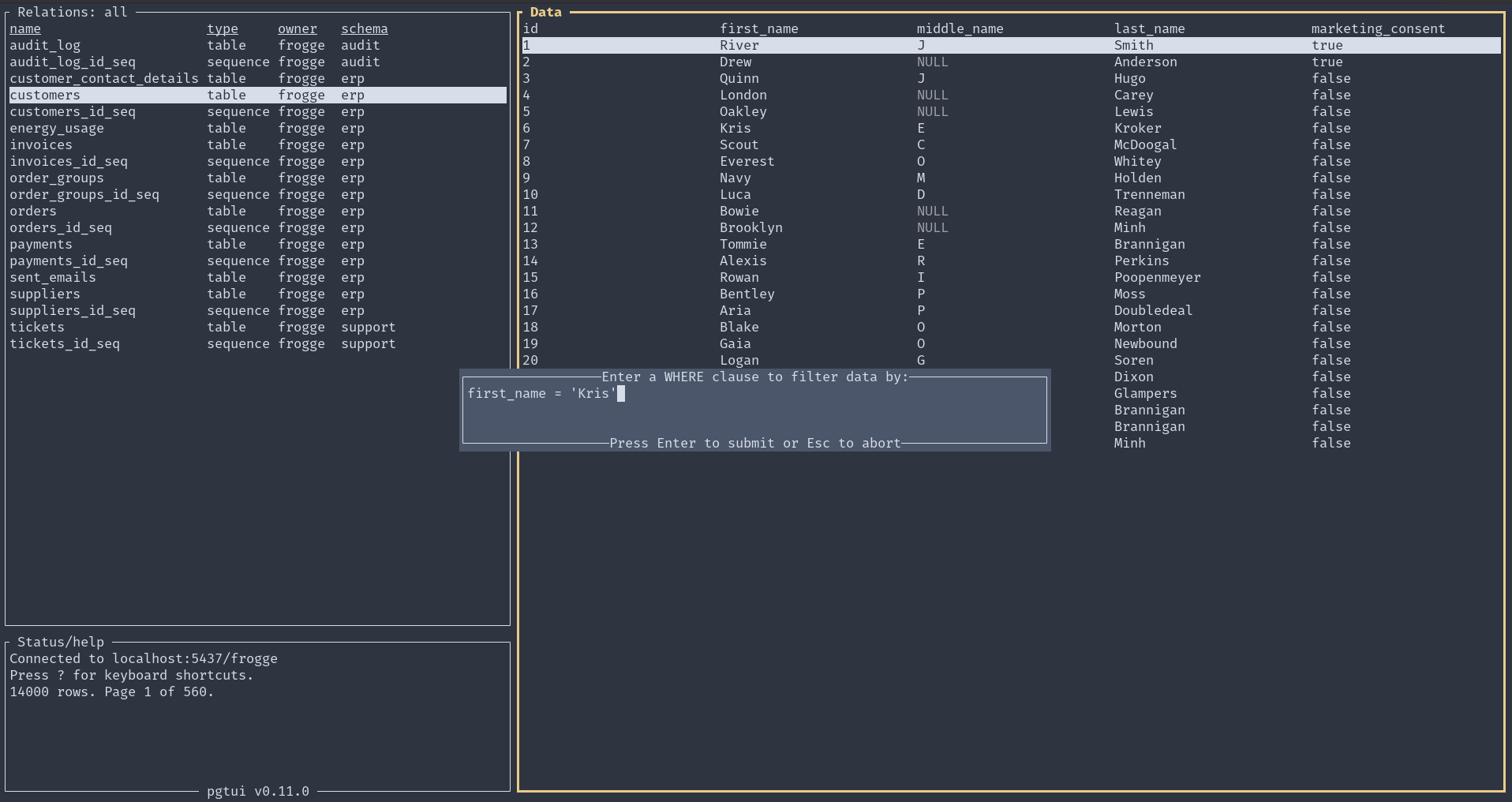
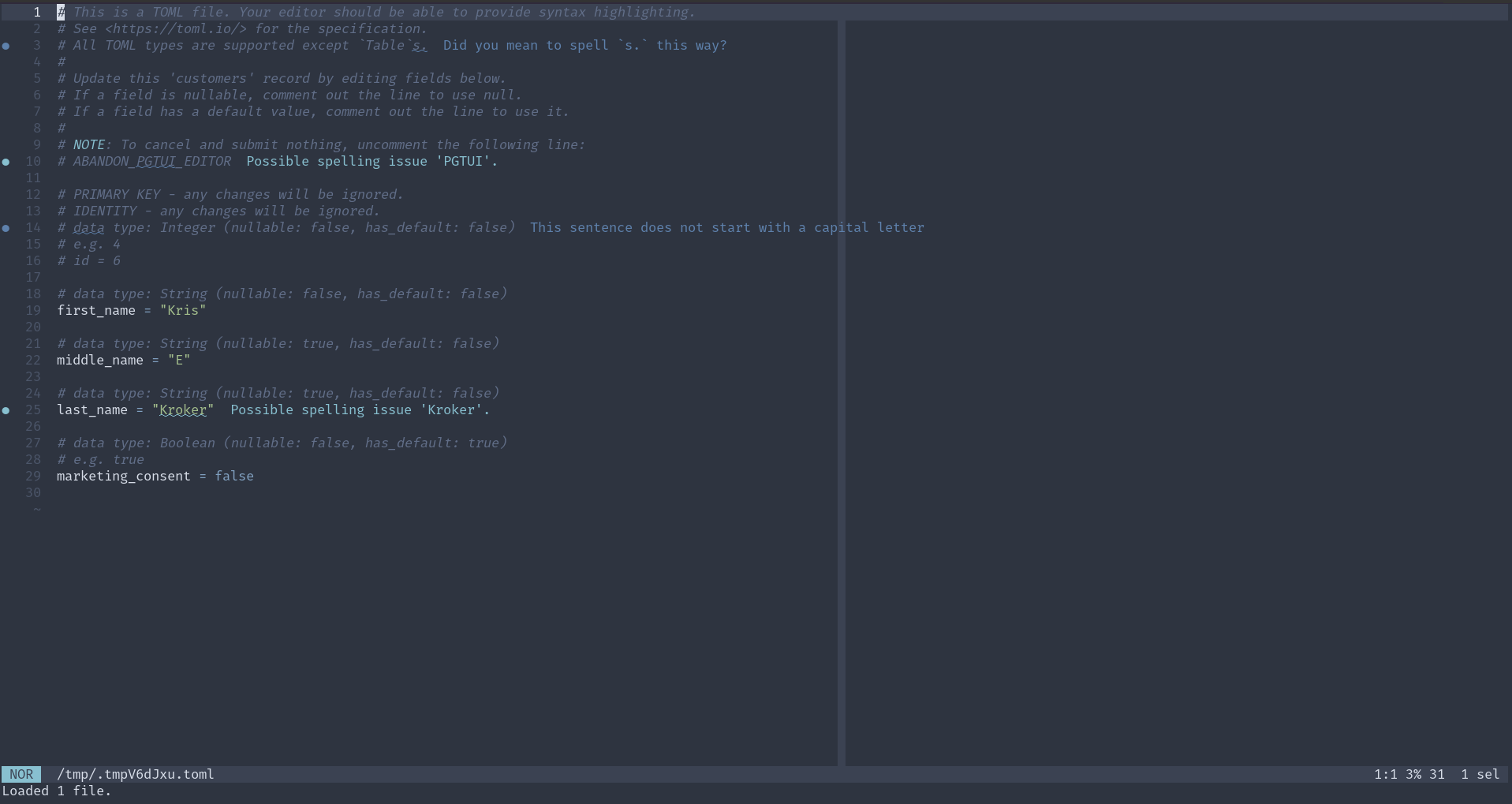
Here is a demo of version 0.10.0:
For further usage and installation instructions, see the README.
Hosting Rust crate documentation with Nginx
April 21, 2024
coding, rust, docs, nginx | permalink
I didn't come across a guide on how to do this with an online search (but hey, online search is a dumpster fire like most things on the internet nowadays), so thought I'd write up something quick to help others looking to host their own crate documentation. It's quite easy if you're already familiar with nginx. Here I'll be using the work project I did this for as an example. The source is available at https://github.com/dvrpc/traffic-counts; it contains a library and binary program.
Let's start locally. Clone that repo or use one of your own and then use cargo, that wonderful tool, to create the html documentation: cargo doc --no-deps --open. --no-deps excludes documentation for any dependencies; leave it off if you want them. --open opens the documentation in your browser. (For more information on creating Rust documentation, see the docs on cargo doc and rustdoc.)
cargo defaults to opening the library documentation when there is both a library and a binary, but you can easily get to the binary docs from the sidebar. Let's examine the URL we'll need to replicate. For this project, for me, the address is file:///home/kris/dvrpc/traffic-counts/traffic-counts/target/doc/traffic_counts/index.html. The binary docs are at file:///home/kris/dvrpc/traffic-counts/traffic-counts/target/doc/import/index.html. What follows target/doc/ is the important part. (That's the default location, but it's configurable.)
There is no page above those; going to file:///home/kris/dvrpc/traffic-counts/traffic-counts/target/doc/ will give you the directory index. However, as you can see by visiting that directory, there are all kinds of things there that need to be included. So, we'll make the contents of that entire directory accessible, and, though not necessary, redirect from the bare /doc path to the library's documentation.
Now go to the server (Debian for me). I cloned the repo to /opt, cd'd into /opt/traffic-counts, and ran cargo doc --no-deps. The library's index.html is located at /opt/traffic-counts/target/doc/traffic_counts/index.html. For the binary documentation, it's ...doc/import/index.html.
And finally, here are the nginx header directives, in a jinja2 template, that allow you to then serve these static files. {{ docs_url }} is the root path you want them hosted at, e.g. use "/traffic-counts/docs" for http://example.com/traffic-counts/docs. Don't forget to reload nginx after you add this to your configuration.
# Traffic Counts documentation

# Make everything at target/doc available.
location {{ docs_url }} {
    alias /opt/traffic-counts/target/doc;
}

# There is no top-level index, so redirect it to the library crate
# with the trailing slash
location = {{ docs_url }}/ {
    return 301 $scheme://$http_host{{docs_url }}/traffic_counts/index.html;
}
# and without the trailing slash
location = {{ docs_url }} {
    return 301 $scheme://$http_host{{docs_url }}/traffic_counts/index.html;
}
In the return (redirect) statements, I use $scheme://$http_host so that it'll work in both production and development environments. Particularly useful is $http_host, which will include the port with a localhost address.
Associated Functions
April 8, 2024
Associated functions in traits can be very useful.
--show-output with cargo test
February 2, 2024
daybook, rust, testing | permalink
cargo test does not display any standard output from successful tests, just that the results were successful. To get around this and see the output of dbg! or println! statements, I usually make a false assertion so that a test fails and these get shown. However, an easier way is to use the --show-output flag: cargo test -- --show-output, as mentioned in the Book. The cargo test section of the Cargo Book does not list this (for some reason unclear to me), but instead cargo test -- --nocapture, which has the same effect. I'm pretty sure I've come across --nocapture before, but I think --show-output will be easier to remember. Well, maybe. I've definitely read the book and forgot about --show-output. Noting here should help.
Capturing Catchall Test Value
January 18, 2024
I seem to have forgotten that when pattern matching in Rust, you can capture the value of a catchall test (left side of arm). I typically just use _, which will match anything, but isn't captured for further use. By creating a variable instead, it can be used on the right side of the arm, for whatever purpose. Realized this from watching Zoo's Rust Club: Error-handling.
'static for error types
January 6, 2024
daybook, rust, error-handling | permalink
A suggestion from Jon Gjengset in the chapter on error handling in Rust for Rustaceans:
Finally, where possible, your error type should be
'static. The most immediate benefit of this is that it allows the caller to more easily propagate your error up the call stack without running into lifetime issues. It also enables your error type to be used more easily with type-erased error types, as we’ll see shortly.
Variable Number of SQL Clause Predicates
January 4, 2024
daybook, rust, sql | permalink
From reviewing my notes on sqlx from a couple years ago, it seems I came up with a way to handle a variable number of SQL WHERE clause predicates, since there's no built-in way to do this. Looking at it now, it seems a little convoluted. It seems I also got a couple of suggestions from the maintainer, which I unfortunately only wrote down but didn't actually use, because they would have been a good foundation to start from, and are similar to what I did this time around. Anyway, I'm glad I forgot to check my notes before starting this little endeavor, because I think my old method would have thrown me off track for a bit. This time around, my solution is more robust, capable of handling any number of predicates. Here it is in an API I'm building with Dropshot.
/// Get union membership by union.
async
Broken Pipe
May 11, 2023
I went down a little rabbit hole after getting a "broken pipe" error when trying to pipe the output of ts-cli to another program (head/tail). The short version of what I've learned is that repeatedly calling println! is not very performant and can cause this error. So what I'm going to do is stick all output into a String, locking a BufWriter on io::stdout, and writing to it with writeln! (and calling .ok() on it to ignore any errors). (I also tried using writeln! every time something needed to be printed, but this slows this down significantly. So both are needed - a single string and the lock/writeln! once. This is now done on the Summary command and pipes are working.
How to Learn Rust
January 21, 2023
It's been somewhere around two years since I first began to learn and love Rust. In that time, I've read a lot of things about the programming language. Here are a few resources I recommend to someone who wants to learn it as well.
Read this first: How Not to Learn Rust
Rust has its own list of learning resources, and I think they should be the starting point for anyone:
However, I'd say that Rust by Example was the least useful to me, perhaps because I did the book and Rustlings first. In any case, I recommend doing something like this: read the book and do the Rustlings course at the same time, then work on some small project, check out Rust by Example, then read the book and do Rustlings again. I think I'm on my fourth run of Rustlings and each time I notice that my skills are improved, but there are also still some things that I have to seek help for.
Also, note that there's now an interactive version of the book, from two researchers at Brown University. Maybe you want to try that out instead of the standard version?
Next I'd recommend the 2nd edition of the book Programming Rust. It's absolutely great and I've found that it is also a good reference to turn to first, rather than trying to search online.
Speaking of online help, you cannot go wrong with the Rust users forum. Search it for issues you have. Regularly browse it to see other questions people have and the solutions that are proposed.
There's also a plethora of Discord servers out there - two general Rust ones and it seems like one for every published crate. I personally dislike Discord because it walls off knowledge and is an absolutely horrible platform for trying to discover information (it was, after all, meant for gaming chat), but that's often where you have to go to get help for very specific things. If you can't find help elsewhere, see if the tool/framework/whatever has a Discord server and then start punching words into the search box and try to maintain patience as you wade through 50 different conversations to find what you're looking for.
Finally, something adjacent to this brief discussion is Rust Edu, which "is an organization dedicated to supporting Rust education in the academic environment."
That should get you started!
Addendum: Other Resources
- The Mediocre Programmer's Guide to Rust
- Compiler-driven Development: Making Rust Work for You - talk given by Jacob Pratt at RustConf 2024 that is beginner-friendly
- Flattening Rust's Learning Curve
- Distilled Rust
Addendum: Why learn Rust?
If you are here, you are probably already convinced that you want to learn Rust. But if not, I'm starting to collect some articles that praise Rust and explain why. I'm not sure if I'll keep this section or not - it may go away.
let if
October 13, 2022
I've used the let if pattern before, but not enough to remember how it works, so had to refresh myself on it. It's very useful. Here's a sample from tp-updater:
let updated_indicators = if self.updated_indicators.is_empty else ;
Looping with modulus
July 27, 2022
daybook, rust, embedded | permalink
You can use a modulus operator to loop around the end of a range quite efficiently, which would come in handy in an infinite loop. I discovered this in Section 5.6 of the embedded Rust Discovery book. It was used there for turning LEDs on and off; here is just printing out the vars:
Use format! to turn chars to string
June 30, 2022
While working on a Rust exercise, at first I did some convoluted way of turning two chars into a string. But it's quite simple with the format! macro: format!("{ch}{next_ch}").
Generic and traits
April 18, 2022
I finally have a decent understanding of generics and traits. Something clicked when I was reading about them in Ch 2 of Programming Rust. I imagine that I came across similar descriptions of these before, but it really helped this time around having some more experience with the language. I don't think I knew that generic types were called "type parameters" when you put them in function signatures. So, just having a term for that helps. That's fn<T>(t: T) {}. And you can specify not just any type, but a type that implements a specific trait: fn<T: FromStr>(t: T) {}, which can be read as "For any type that implements the FromStr trait." When writing this up in my notes, I also came across returning a type that implements at trait, which makes more sense now, although I just came up with a few questions to dig deeper into the whole subject that I need to look into sometime.
fold()
February 20, 2022
I think I finally get fold(). In Rust at least, this is a method on an iterator. Its form is:
.fold;
1..=4 is a range, so this will iterate from 1 to 4.
The 1 immediately following fold( is the initial value. So this could be anything, and will typically come from whatever you're iterating over. The next part - |acc, x| acc + x is the closure that .fold() takes - this consists of two parameters (the "accumulator", acc, and current element of the iteration, x) and the operation of the closure (acc + x). So with each iteration, the operation is performed, and the acc parameter holds the result, which then gets used in the next iteration.
The above example is a factorial, and so multiples every number for 1 to 4 (inclusive) together, resulting in 24.
Client Interface First
January 19, 2022
Interesting bit from the Rust book, Ch. 20:
When you’re trying to design code, writing the client interface first can help guide your design. Write the API of the code so it’s structured in the way you want to call it; then implement the functionality within that structure rather than implementing the functionality and then designing the public API.
Similar to how we used test-driven development in the project in Chapter 12, we’ll use compiler-driven development here. We’ll write the code that calls the functions we want, and then we’ll look at errors from the compiler to determine what we should change next to get the code to work.
Transforming programming
January 17, 2022
"Transforming programming" is the title of topic 30 of The Pragmatic Programmer (though a better title would probably be "transformational programming".) The gist is "we need to get back to thinking of programs as being something that transforms inputs from outputs". Uses example of Unix philosophy and piping. This makes a lot of sense to me, and in Rust it is essentially how iterators work - you keep chaining methods onto the iterator to do some work on each element in the collection, and then pass the outputs to the next method. This section also mentioned an and_then function, which Rust has, though they weren't talking about it in a Rust context.
Refactoring in Rust
January 9, 2022
I posted about broken-links to r/commandline the other day, and someone suggested that I use a HEAD rather than GET request to check link validity. A fair point, although what it made me realize was that I was making a GET request to each URL twice, and I could eliminate the second one if I just grabbed the html the first time and passed that along. It took about an hour and a half, and it seems to have improved performance by about 25% (depending on mix of URLs checked). So I published another version of it - 0.2.1. The refactoring wasn't the simplest thing to do, but I found that Rust's type system and the compiler errors made it pretty smooth and almost guided me in the right direction.
Iterators and collect()
January 8, 2022
Figured out rustlings/iterators2. Now the solutions seem obvious. I think what I was doing wrong was thinking that .collect() created a vector, whereas it creates whatever kind of collection you tell it to or that it infers. In this exercise, there were two functions requiring you to have a different result type, but the code was the same for both. I was making it much harder than it was, not taking advantage of .collect() and Rust's ability to infer the type.
Before solving the exercise correctly, I spent about two hours reading through the documentation on iterators as well as part of "A Journey into Iterators" by Ana Hobden. Both were very helpful. I discovered the .inspect() method in the Hobden piece, and it seems like it will really be useful in debugging/figuring out iterator chains.
Trait function signatures
January 7, 2022
I thought when you implemented a trait, the function had to have the exact same signature as the trait, but apparently you can (at least) change the parameters from being immutable to mutable. This is from rustlings/traits/traits2, the instructions of which said to implement AppendBar on a vector of strings, such that you appended "Bar" to it:
This Is What I Know about match
December 16, 2021
I've been learning Rust for some time now, and really enjoying it - the static typing, the helpful compiler, the tooling, the documentation, just about everything. I think I'm in the neophyte stage. Anyway, this is my attempt to describe the match keyword, mostly (but certainly not entirely) in my own words.
match is the keyword for pattern matching - like case in Bash and other languages, though a little more powerful. Like case, it is similar to a series of if/else expressions, where you go down through them to control the flow of code. However, if and else if expressions must evaluate to a boolean value. The match expression can evaluate to any type. Each possibility is an "arm" that has a pattern that is evaluated. All arms need to return something of the same type. The first pattern that is true has the code associated with it run (which follows a => symbol, potentially in a curly brace block, if longer than one line) - Rust will not examine any subsequent arms. Additionally, matches are exhaustive: every possible option must be handled, otherwise the code will not compile.
Use "match guards" to further refine what you are matching. This is done by following the pattern with a bool-type expression. See 2nd arm of the longer example below.
Here are some syntax options for the tests (the left side):
- just provide the value
x ..= y- inclusive range from x to yx | y- x or y_- any (this will often be done as the last arm to catch all other possibilities)
Here is an example from the Rust book, matching on enum variants:
This example (from my solution on Exercism) shows a number of these concepts as well as the matches! macro:
You can also assign the result from a match expression to a variable (example from Tim McNamara's Rust in Action, Ch. 2):
let needle = 42;
let haystack = ;
for item in &haystack
There is a shorthand expression when you care about only one of the cases and don't need to do anything for all others: if let:
if let Some = some_u8_value
(An update from the future: At first, I found the let here to be confusing, because nothing was being assigned in the block. What is the let doing!? It seems clearer syntax would be if some_u8_value == Some(3). I'm sure there are good reasons this isn't possible. But after a while, it became second nature so I stopped thinking about it.)
You can also use else with this, when you want to define the behavior to be done instead of just no behavior.
Sources:
- https://doc.rust-lang.org/std/macro.matches.html
- https://doc.rust-lang.org/std/keyword.match.html
- https://doc.rust-lang.org/reference/expressions/match-expr.html
- https://doc.rust-lang.org/reference/expressions/match-expr.html#match-guards
- https://doc.rust-lang.org/stable/book/ch06-00-enums.html
- https://www.rustinaction.com/
Braces
October 2, 2021
daybook, rust, bash | permalink
Rust and Bash have a very similar construct for iterating over ranges: x..y. Bash uses it like for i in {1..9} while Rust doesn't use the braces (though seems like parentheses may be used - but not required).
I spent some time reworking my bash note on parameter expansion (actually calling the value of a parameter by using the $ symbol), and think I have further strengthened my understanding of it, using doubles quotes in conjunction with it, and using braces in conjunction with it.
One important reason to use braces around a parameter's name (but after the $, like this: "${somevar}"), is that you can make a default value, either for immediate expansion or to assign the default value to the parameter. Immediate expansion (won't be used again if you reuse the parameter): ${somevar:-this}". Assignment (assigned here, will be used as value of the parameter in subsequent uses): "${somevar:=this}".